Reduce Stl File Size Blender
Reduce STL File Size in Blender
Introduction
The STL (Stereolithography) file format is an industry standard 3D printing file format used to create 3D objects. The STL file format is widely used in 3D printing, 3D scanning, and 3D modeling. It is a popular file format for sharing 3D models and can be opened by many 3D modeling software programs. However, one of the drawbacks of the STL file format is that it can be quite large in size, making it difficult to share or upload. Fortunately, there are a few ways to reduce the size of an STL file in Blender, an open-source 3D modeling software program.
Overview of STL File Format
Before diving into how to reduce the size of an STL file in Blender, it is important to understand the basics of the STL file format. STL files are made up of triangles, which form the surface of the 3D model. The STL file is a "polygon mesh" that contains all of the necessary information for 3D printing. This mesh is composed of triangles, which are the most basic shape for 3D printing. Each triangle is a surface that connects three points, known as vertices.
Methods to Reduce STL File Size
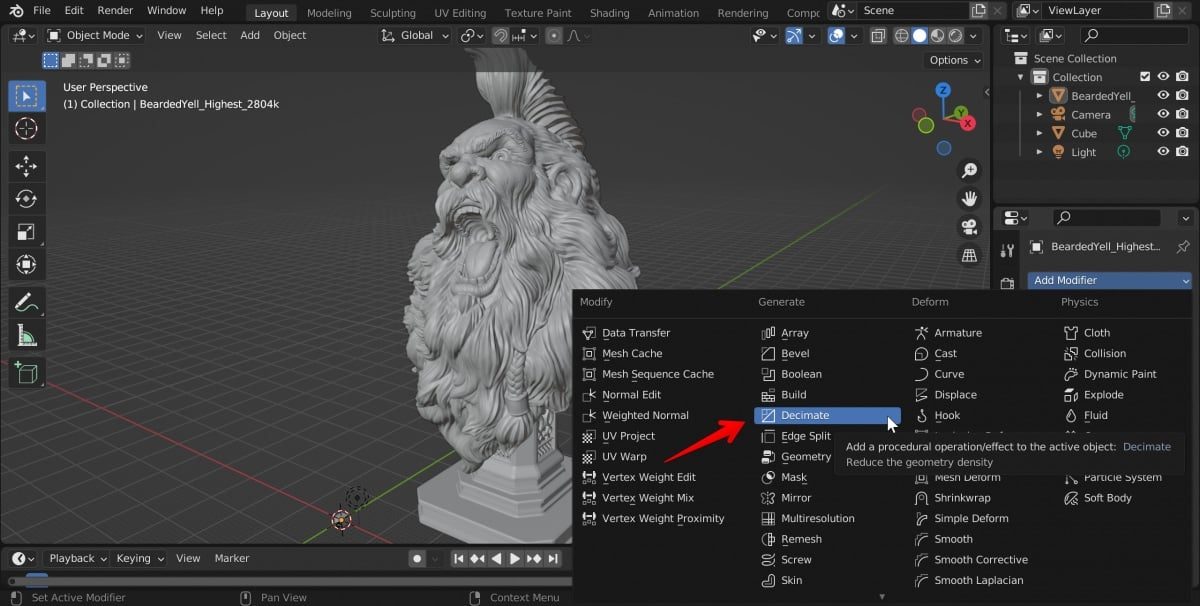
There are several methods that can be used to reduce the size of an STL file in Blender. The first method is to reduce the number of triangles in the mesh. This can be done by using Blender's "Decimate" tool, which automatically reduces the number of triangles in the mesh. This can be done by selecting the object in the 3D viewport, then going to the "Modifiers" tab and selecting the "Decimate" option. The user can then adjust the "Ratio" slider to reduce the number of triangles in the mesh.
Simplify Geometry
The second method to reduce the size of an STL file in Blender is to simplify the geometry of the model. This can be done by selecting the object in the 3D viewport, then going to the "Modifiers" tab and selecting the "Simplify" option. The user can then adjust the "Ratio" slider to simplify the geometry of the model. This will reduce the number of triangles in the mesh and thus reduce the size of the STL file.
Removing Unnecessary Vertices
The third method to reduce the size of an STL file in Blender is to remove any unnecessary vertices. This can be done by selecting the object in the 3D viewport, then going to the "Edit" tab and selecting the "Remove Doubles" option. This will remove any vertices that are not necessary for the mesh. This can significantly reduce the size of the STL file.
Conclusion
Reducing the size of an STL file in Blender can be done using a few different methods. The first method is to reduce the number of triangles in the mesh using the "Decimate" tool. The second method is to simplify the geometry of the model using the "Simplify" tool. The third method is to remove any unnecessary vertices using the "Remove Doubles" option. All of these methods can be used to significantly reduce the size of an STL file in Blender.
