How To Convert Blender Files To Stl
How to Convert Blender Files to STL
Blender is an open-source 3D modeling software that provides a wide range of tools for creating 3D models. It is used in animation, video game development, and other industries. It is also used for creating 3D printable models. If you want to print a 3D model, you need to convert the Blender file to STL.
What is STL?
STL stands for Standard Tessellation Language. It is a file format that is used to store 3D models. It is mainly used for 3D printing and other related applications. STL files contain a list of triangular facets that describe the surface of a 3D object. The facets are specified in the form of triangular polygons and can be used to generate a physical object.
How to Convert Blender Files to STL?
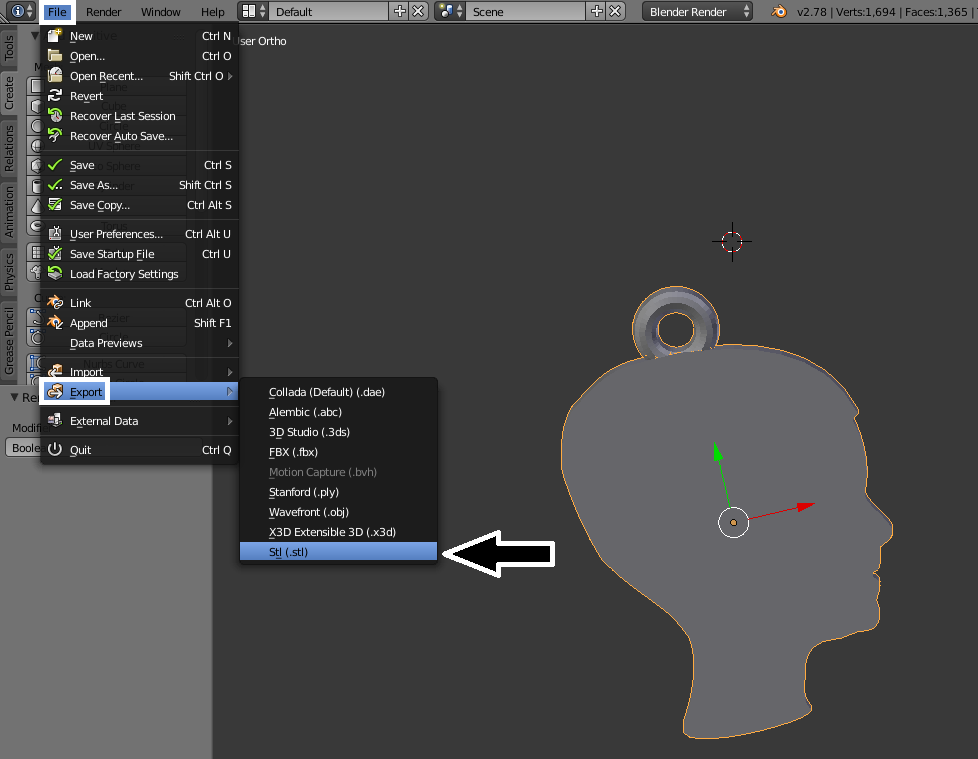
The first step in converting a Blender file to STL is to open the model in Blender. Once the model is open, you need to select the object or objects you want to convert. Next, you need to select the Export option from the File menu. In the Export menu, you will see the option for STL. Once you select the option, you will be asked to specify the name and location of the file. Once you do, click on the Export button to save the file.
The next step is to open the STL file in a 3D printing software. There are many software available for 3D printing. Some of the popular software are Cura, Simplify3D, and Slic3r. Each software has its own set of options and features. Depending on the software you use, you will need to adjust the settings to generate the best print. For example, you may need to adjust the slicing settings and the print quality settings.
Once you have adjusted the settings, you can generate the G-Code file. The G-Code is a set of instructions that tell the 3D printer how to create the model. Once you have generated the G-Code file, you can send it to the 3D printer to start the printing process.
Conclusion
Converting a Blender file to STL is not difficult. With the right software and settings, you can easily convert your models and print them. Once you have printed your model, you can continue to refine and tweak the design until you are satisfied with the results.
