Convert Stl To Obj Blender
How to Convert STL to OBJ in Blender
Have you ever needed to convert an STL file to OBJ? Blender is a free open source 3D modeling and animating software, used for 3D printing, game development, and animation. Blender can be a great tool to convert from STL to OBJ. It is very easy to use, and can be done in a few simple steps.
What is STL?
STL stands for Standard Tessellation Language. It is a 3D file format developed by 3D Systems in 1987. STL is the most common file format used for 3D printing, and is primarily used for 3D printing because of its ease of use and the ability to represent a 3D model with a minimum amount of data. STL files are composed of a series of triangles, which allows for the representation of any 3D object.
What is OBJ?
OBJ (or .obj) is a geometry definition file format used by many 3D programs. It is a geometry definition file format that includes information about the 3D object, such as the vertices, faces, and texture coordinates. The OBJ file format does not include any animation data, and is used primarily for 3D printable models and for importing into other 3D programs.
Why Convert STL to OBJ?
Converting from STL to OBJ can be useful in a variety of situations. For example, if you have an STL file that you need to manipulate or modify in a 3D program, you can convert it to an OBJ file and use it in that program. Another example is if you need to export a 3D model to a 3D printing service or 3D file sharing website, you may need to convert your STL file to an OBJ file in order to do so.
How to Convert STL to OBJ in Blender
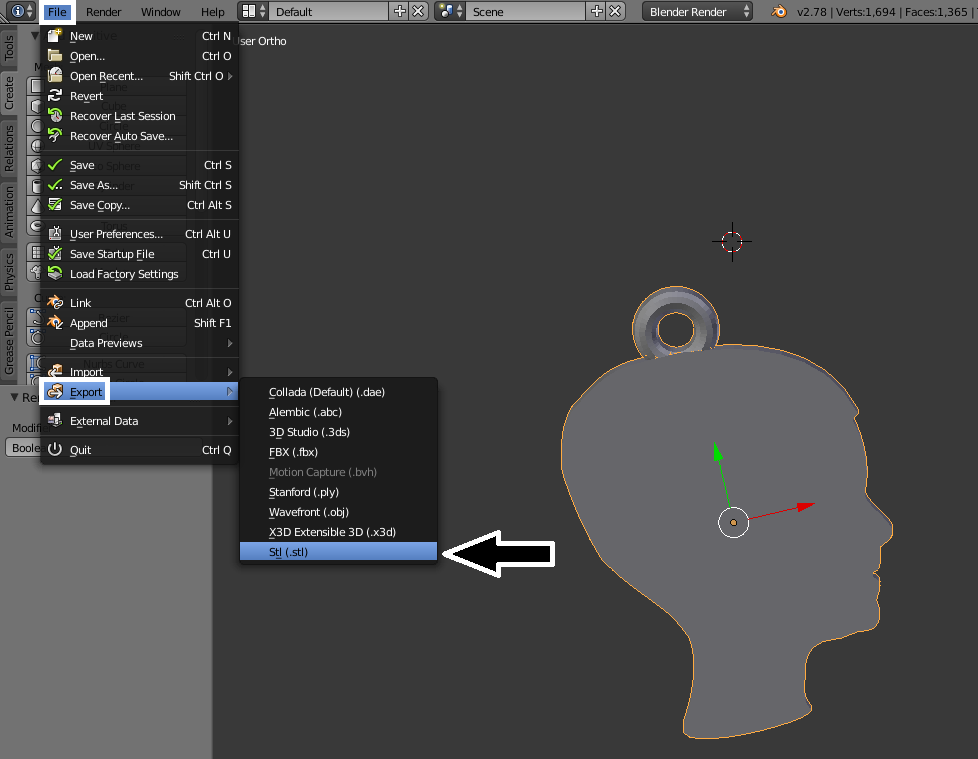
Converting an STL file to an OBJ file in Blender is very easy. First, open Blender and go to File->Import->STL. Select the STL file you want to convert and click Import STL. The STL file will open in Blender, and you can now go to File->Export->OBJ. Select the OBJ file you want to save and click Export OBJ. Your STL file is now converted to an OBJ file.
Tips and Tricks for Converting STL to OBJ
When converting an STL file to an OBJ file, there are a few things to keep in mind. First, make sure that the STL file is properly oriented, as this can affect the orientation of the OBJ file. Second, make sure that the STL file is not too complex, as this can cause the OBJ file to be too large. Finally, make sure that the STL file is not corrupted, as this can cause the OBJ file to be corrupted.
Conclusion
Converting an STL file to an OBJ file in Blender is a simple process. It can be done in a few steps, and is a great way to modify or export a 3D model. When converting an STL file to an OBJ file, make sure to keep in mind the tips and tricks mentioned above in order to ensure that the OBJ file is properly oriented and not corrupted.
