Autodesk 3ds Max Character Modeling
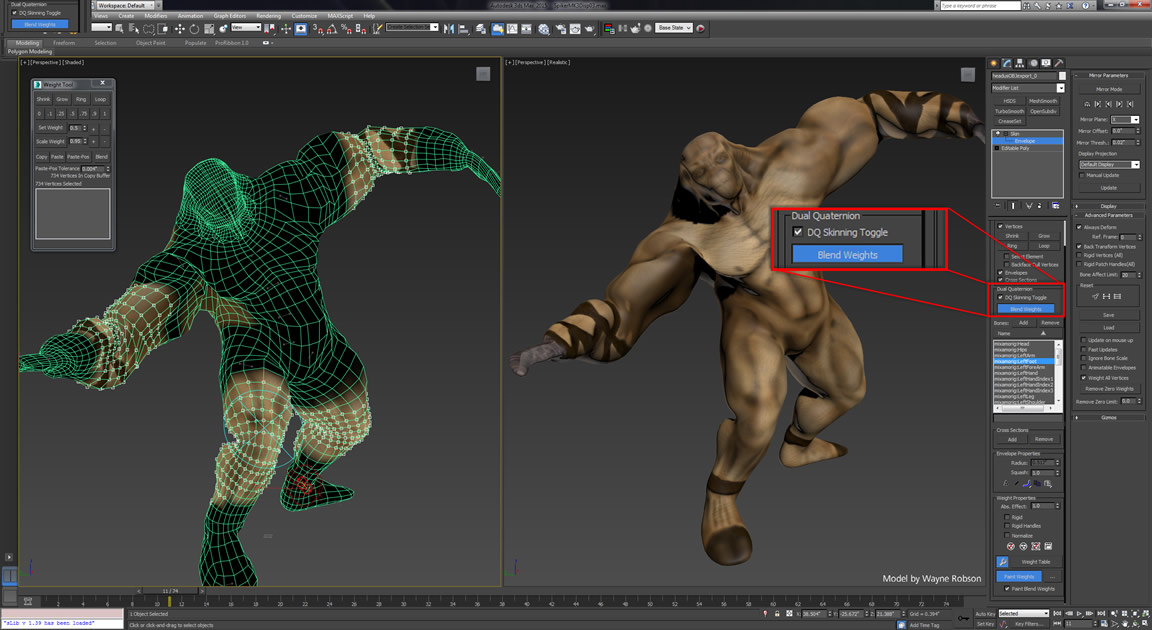
Introducing Autodesk 3ds Max Character Modeling
Autodesk 3ds Max is an incredibly powerful 3D modeling, animation, and rendering software that is used by professional animators, game designers, and graphic designers. It is extremely versatile and can be used to create complex 3D models and animations. Character modeling is one of the most popular uses of 3ds Max and it can be used to create a wide variety of characters, from cartoon characters to realistic human figures. In this tutorial, we will provide an introduction to character modeling in Autodesk 3ds Max.
Getting Started
Before you begin, it is important to understand the basics of character modeling. Character modeling is a form of 3D modeling where an artist creates a character's shape, structure, and appearance. The process can be divided into two main components: modeling and rigging. Modeling is the process of creating the character's shape, structure, and proportions. Rigging is the process of adding joints and controls to the character so that it can be animated.
Once you have a basic understanding of character modeling, you will need to set up your scene in 3ds Max. You should start by creating a new scene in 3ds Max and adding a grid to the viewport. This will help you to visualize the model more easily. You should also set up a basic lighting system and add a camera to the scene. This will help you to create renderings of your model.
Modeling the Character
The first step in creating a character model is to create the basic shape of the character. You can do this by using the Spline and Extrude tools in 3ds Max. Start by drawing out the basic shape of the character in the viewport. You can then use the Extrude tool to add depth to the shape. You can also use the Bevel and Chamfer tools to add details to the character's shape.
Once you have created the basic shape of the character, you should start adding details to the model. This can include adding facial features, clothing, and other accessories. You can use the Polygon and Edge tools to add details to the model. You can also use the Paint Deform tool to add details to the model's surface.
Rigging the Character
Once you have completed the modeling of the character, you can begin rigging the character. Rigging is the process of adding joints and controls to the character in order to animate it. You can use the Skin, Joint, and Physique tools in 3ds Max to rig the character. You can also use the Character Animation Toolkit to add more complex animations to the character.
Once you have finished rigging the character, you can start animating it. You can use the Animation toolbar in 3ds Max to create animations for the character. You can also use the Character Animation Toolkit to add more complex animations to the character. Once you have finished animating the character, you can render out the scene to create a final animation.
Conclusion
Character modeling is a complex but rewarding process. With the help of Autodesk 3ds Max, you can create high-quality character models and animations. This tutorial has provided an introduction to character modeling in 3ds Max. We have discussed the basics of character modeling, the modeling process, and the rigging and animation process. With practice and dedication, you can become a master of character modeling in Autodesk 3ds Max.
